
Resolution, explained
Effective detail is not the number on the box.
In photography, the smallest useful “pixel” can be understood as the smallest circle of confusion the combined camera-and-lens system can produce.
From blur circles to digital pixels
No camera and no lens is perfect. Even with perfect focus, an infinitely small point of light is never recorded as a point, but as a small circle—or, sometimes, an irregular smudge. This is the circle of confusion, usually abbreviated as CoC.
If we consider one CoC equal to one digital pixel, the resulting megapixel estimate is too pessimistic. We also need to account for modulation transfer function, or MTF: the contrast difference a system can preserve between adjacent details. Digital pixels can reach 100% MTF, while photography generally considers 50% MTF “sharp enough.”
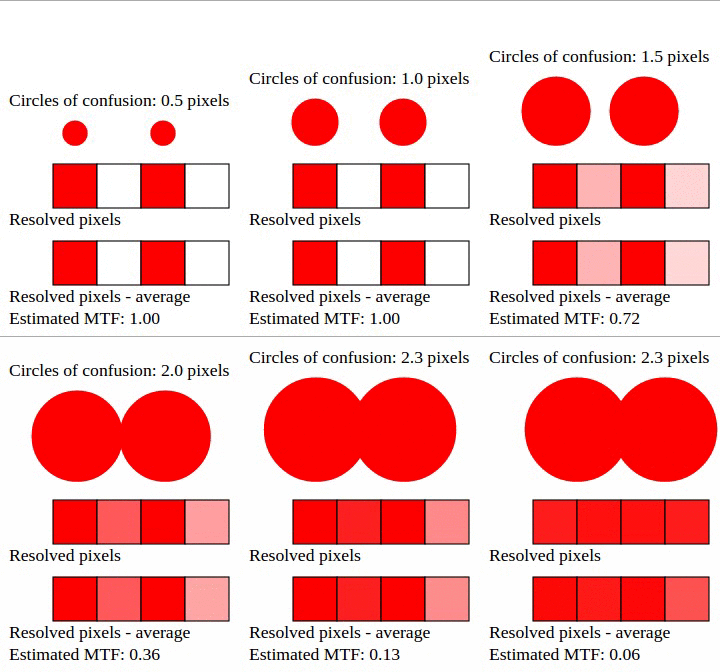
MTF changes depending on whether a CoC strikes the middle or the border of a sensor pixel, so we need an average. On average, a circle of confusion with a diameter of 1.5 digital pixels yields an MTF of 50%.
With this relationship, we can estimate how many “real” megapixels a complete camera-and-lens system can deliver. A system that resolves 2,000 horizontal lines and 1,500 vertical lines has 6.75 effective megapixels (2,000 × 1,500 × 1.5 × 1.5). Achieving that result is quite good and generally requires a sensor with a much higher raw resolution—20MP or more.
Scientifically, it is more precise to discuss resolved lines and MTF. Megapixels, however, are easier to understand and map naturally to the screens where most photographs are now viewed. A Full HD display contains about 2MP, so an image needs at least that effective resolution to appear sharp at full size.
DxO Labs popularized the idea of “perceptual megapixels.” Its formula is proprietary; the method described here is based on our own practical research.
Test the resolution of your equipment
Cameras, lenses, aperture choices, and focus calibration all have a large impact on effective resolution. This simple empirical test can help you find the MTF of a particular camera-and-lens combination.
-
01
Find a high-contrast subject, such as a black-and-white barcode. Avoid smooth transitions between colors and inspect the target with a magnifying glass if possible.
-
02
Keep the camera and subject fixed. Use a tripod for longer exposures, select the lowest ISO, and avoid flash if specular reflections make the lens appear softer when wide open.
-
03
Capture at the highest resolution and use RAW when available. With JPEG, choose the finest quality. Take at least one picture at each full aperture stop.
-
04
Be meticulous about focus. With a DSLR, compare viewfinder autofocus with Live View autofocus to determine which produces the sharpest result.
-
05
Inspect the images on a computer at 500% magnification or higher so the individual pixels and black-to-white transitions are visible.
-
06
Count the gray pixels between a clearly black pixel and a clearly white one. Find the best transition in the image—the one with the fewest gray pixels.
Intermediate results are possible. If two gray pixels are present but one is nearly white or black, the measured contrast falls somewhere between 33% and 50% MTF.
At the sensor’s native resolution, an MTF above 50% is almost impossible and the result will typically be lower. With a Nikon D3200, for example, a 35mm f/1.8G DX lens can reach 50% MTF at most apertures, while other lenses may produce values between 16% and 40%.
Convert MTF into effective megapixels
Once you have estimated the MTF of a lens at each aperture, you can estimate its effective—or perceptual—megapixel count.
We divide the sensor’s raw megapixels (MP) by 0.5, the “sharp enough” MTF for photography, and multiply by the MTF measured in the test. Because megapixels describe an area, both MTF values are squared to keep the units compatible.
Example · 24.2MP sensor at 40% MTF
MPe = 24.2 ÷ 0.52 × 0.42
MPe = 96.8 × 0.16
MPe = 15.5 effective megapixelsIn this example, a 50mm lens performs best at f/8. Its MTF falls to 16% at f/1.8 and 33% at f/16, corresponding to effective resolutions of 2.5MP and 10.6MP. Weak wide-open performance does not automatically make a lens bad. On a full-frame camera, the same lens could deliver about 5.5MP at f/1.8 due to the larger sensor. A DX-optimized zoom may perform better wide open on a DX camera than a full-frame lens does.
What is a good effective resolution?
In practical terms, an image with 6MP of effective resolution can already be considered good. Producing that much real detail takes sound technique, good equipment, and an understanding of focus, ISO, and the best aperture for the lens. A 3,000 × 2,000 image is also a useful export size for photographs developed from RAW files.
Higher starting resolutions remain useful because they allow more cropping. A 6MP image downsized from a 15MP RAW file is sharper than one captured at 6MP, since digital pixels can preserve MTF above 50%. A downsized image can approach, but not exceed, about 80% MTF.
Maximum sharpness is not always desirable. A wide aperture can be flattering for portraits because its softness hides small skin imperfections and creates a dream-like character.
Results also change with subject distance, color, and texture. A 50mm lens may approach 50% MTF at f/8 and 33% at f/1.8 when photographing a distant building. Windows make useful targets because they are high contrast, and post-processing may behave differently with colored edges than with black-and-white ones. This color response is likely one ingredient in more advanced perceptual-resolution measurements.
The Nyquist limit
The relationship between MTF and megapixels is tied to the Nyquist limit, which affects every digital medium. To represent a signal with frequency f, a digital system requires at least 2f samples, or pixels.
Consider a zebra pattern made of alternating black and white lines. It needs at least one pixel per line, so 60 line pairs require at least 120 pixels. This is an absolute limit. If we feed 90 line pairs into the same 120 pixels, the recorded image can produce a false pattern of 30 line pairs: aliasing, often seen in photographs as moiré.
The theoretical Nyquist limit assumes perfect decoding, which is not physically achievable. In practice, those 120 pixels can struggle with signals above 30 or 40 line pairs. A low-pass filter helps by reducing MTF as frequency rises, preventing false patterns before the theoretical limit is reached.
Until roughly 2012 or 2013, nearly every camera sensor included an optical low-pass filter (OLPF). It sacrificed some sharpness to prevent moiré. An ideal filter would gradually reduce MTF from 100% to 50% near the Nyquist cutoff and reach 0% above it, but such a filter cannot be built perfectly. Real OLPFs must suppress more detail than strictly necessary.
Many modern cameras omit the OLPF. Lenses themselves can act as low-pass filters when their resolving power is lower than that of the sensor, and filtering twice compounds the loss: combining a lens limited to 20MP with an OLPF limited to 20MP can yield only about 10MP of effective detail. Modern software is also increasingly capable of correcting moiré after capture.