 Touch RPN version 7.20
Touch RPN version 7.20
Touch RPN version 7.20
In the next few weeks, the Touch RPN app will be updated to version 7.20 for both supported platforms: iOS and Android. The Web version has received updates as well.
The Settings pane gets two new items: ON key label style, and top band size.
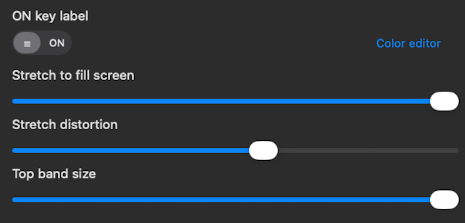
The style of ON key label can be either of: menu icon (known as "hamburger icon", the default) and the traditional ON label like a physical calculator.
This feature was requested by some users that like better the traditional look.
The top band size is a slider that regulates the space partition between the LCD and the keyboard. By default the slider is at maximum value, that corresponds to the visual proportion of a physical calculator. This configuration is only relevant for the landscape (horizontal) orientation.
This feature helps to increase the app's accessibility in smartphones with smaller and slender screens. Reducing the top band increases the keyboard area, making it more comfortable to type on.
On top of the improvements to the calculator proper, the Web version got a couple features of its own.
a) In the RPN program editor, when a program line is inserted or deleted, the GTO instructions are automatically adjusted throughout the program.
This is relelevant for the flavors where GTO jumps to absolute positions: financial, advanced financial, and scientific basic. This change does not affect the scientific flavor since GTO jumps to LBL labels in this one.
b) The keyboard shortcuts are now overlaid on the calculator itself. Press the button "Keyboard shortcuts" to toggle the shortcuts.
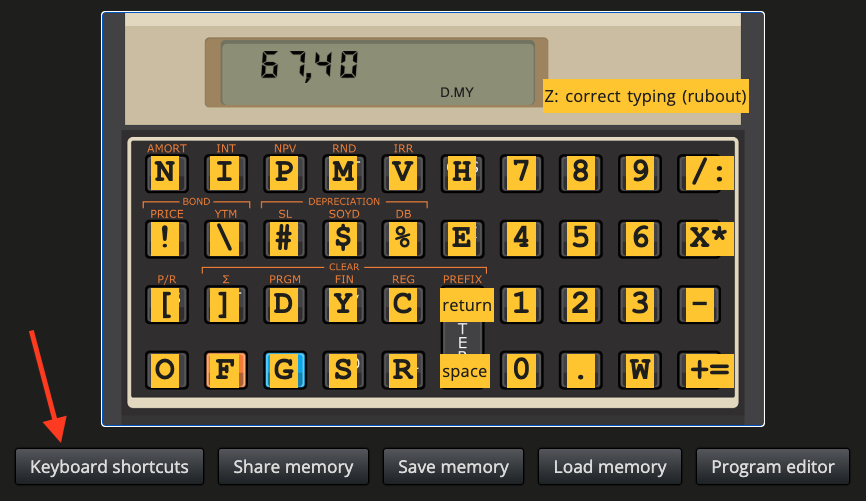
This feature works the same for all RPN flavors made available in the Web.
All flavors have received improvements to better align their behavior to physical RPN calculators. These changes have no impact in normal/casual operation of the calculator, but they might be important for users that write more elaborate programs.
We would like to thank C. Nunes and F. Vincent for their bug reports and improvement requests that motivated many of the abovementioned changes and new features of the app.